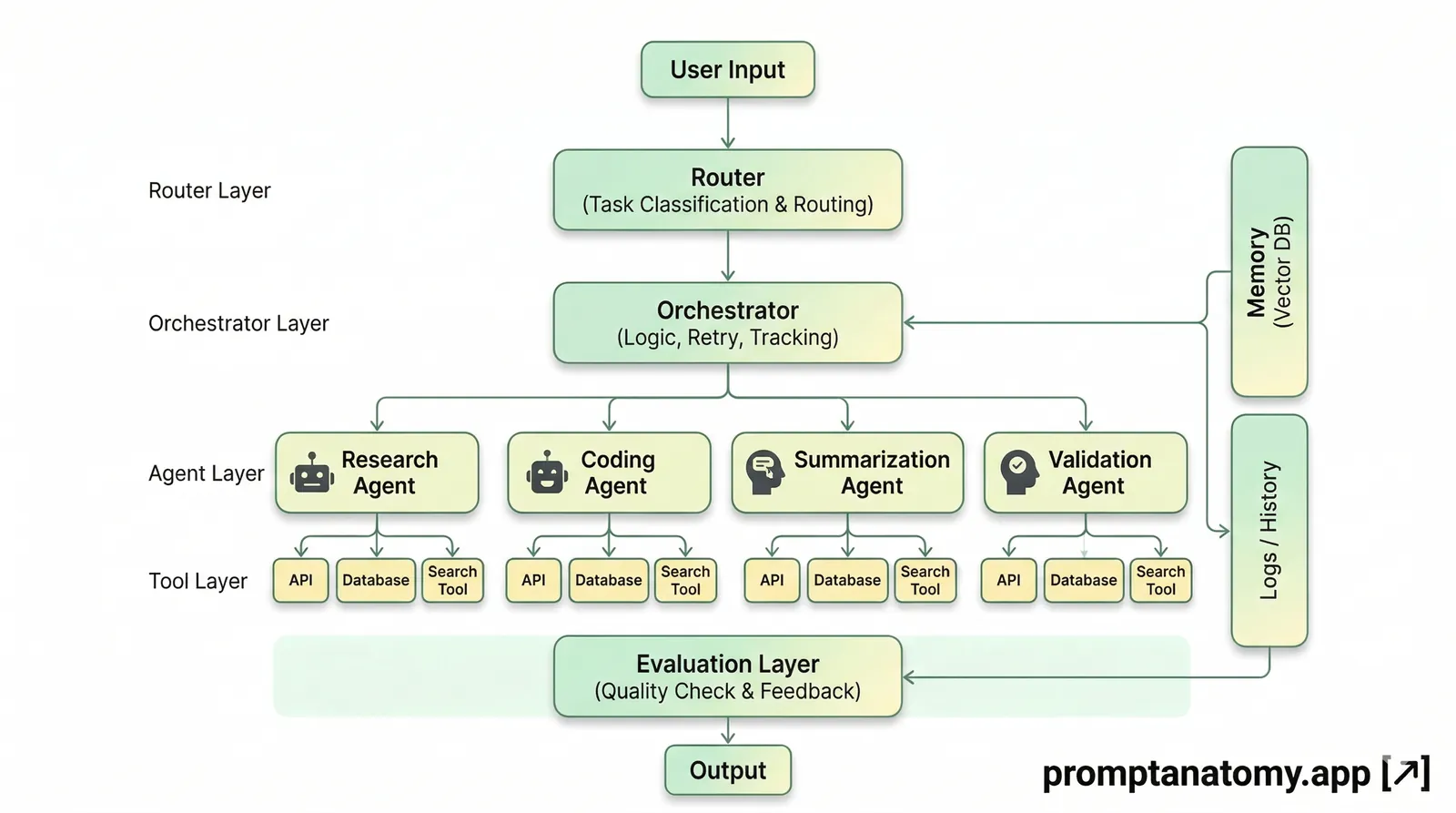
Agent hype collapses when workflows are vague. A language model with tools is not an agent workflow—it is a risk multiplier. Durable agent design starts with a bounded business task, explicit data boundaries, human escalation, and evaluation before scale.
This guide maps a business task to an agent-ready process. It assumes you already treat the model as one component inside workflow and governance, not as the whole system—see The Model Is Not the System if that foundation is still debated in your org. Agent and MCP terms: Glossary. For orchestration framework comparison (LangGraph, CrewAI, Microsoft Agent Framework), see production selection guide. If your team is debating whether to add tools, memory, and orchestration before basics are stable, read the visual primer What Scales AI Beyond Basics first—it names the ladder from context engineering through agents without skipping control layers.
Step 1 — Define the task
Write the business outcome, acceptable error rate, and who signs off—not the model persona. Personas do not replace approvers, SLAs, or eval thresholds.
Start with one sentence a process owner would defend in a steering meeting: what changes for customers or revenue if this works? If the sentence mentions “AI adoption” or “copilot usage,” rewrite it until it names a operational result—time, error rate, throughput, or cost within a defined scope.
| Field | Example (tier-2 ticket routing) |
|---|---|
| Outcome | Route inbound tier-2 tickets to the correct pod within 4 business hours |
| Error tolerance | Under 2% mis-routes on a held-out set |
| Sign-off | Support ops manager before auto-actions in v1 |
If you cannot name the approver, the task is not agent-ready. If you cannot name the error tolerance, you will not know when to roll back.
Anti-pattern: “Build an agent that helps support.” Better: “Suggest pod assignment with human confirm; mis-route rate under 2% on 50-case eval.”
Tip: Write the outcome before selecting tools. Tools should fit the map, not define it.
Step 2 — Map context and tools
List allowed data sources, APIs, and actions. Anything outside the list is out of scope for v1. Agents amplify whatever context you give them—approved and unapproved.
For tier-2 routing, allowed sources might include: ticket subject and body, customer tier tag, product line from CRM, and routing playbook sections tagged approved. Denied: other customers’ tickets, HR notes, unreleased product roadmap.
Document the allow/deny matrix formally—Data Boundaries for AI Agents provides a template. Policy triggers (keywords, data classes, high-value accounts) should force human review even when the model is confident.
Failure mode: “Give the agent access to everything and we’ll tighten later.” Later arrives as an incident. Fix: v1 allow list only; expand only after eval passes on the smaller surface.
Step 3 — Design handoffs
Escalate to humans when confidence is low, policy keywords fire, or required fields are missing. Define SLAs for human review on high-value accounts—the same discipline as human-to-human handoff rules.
Handoffs need triggers, owners, and evidence in logs. Example triggers for routing: missing product line, VIP customer flag, regulatory keyword in ticket body, or eval failure on a shadow run.
| Trigger | Action | SLA |
|---|---|---|
| Confidence below threshold | Queue for support lead | 4 business hours |
| VIP flag | Human assigns pod | 1 business hour |
| Policy keyword | Legal review queue | 24 hours |
Tip: Log every override. Overrides are training data for context and eval improvements, not embarrassment to hide.
Step 4 — Evaluate before scale
Agents fail silently when teams scale on anecdotes. Define smoke, pilot, and scale gates with numeric pass conditions.
| Gate | Pass condition |
|---|---|
| Smoke | 10 historical cases classified correctly |
| Pilot | 50 live cases with override logged |
| Scale | Mis-route rate within tolerance for 30 days |
Build a held-out set before tuning prompts—Evaluation Hooks for AI Workflows describes sample cases and release discipline. When the model, prompt, or tool list changes, rerun the set before promoting.
Failure mode: Declaring victory after one executive demo. Fix: Weekly scorecard on pass rate and override reasons.
When to promote from prompt to agent
A strong prompt in chat is not automatically an agent. Promotion makes sense when the work is repeatable, tool-backed, and auditable.
| Question | Prompt enough? | Agent candidate? |
|---|---|---|
| Same steps weekly with same sources | Often yes | If integrated |
| Must call APIs or CRM | No | Yes |
| Needs state across hours/days | Rarely | Yes |
| High-risk external actions | Human send | Agent draft + gate |
Promotion path:
- Freeze prompt version that passes eval.
- List allowed tools and data (boundaries).
- Add logging and human send gate.
- Run pilot with override metrics before removing human from loop.
If steps one through four feel heavy, stay on prompt-assisted workflow. Structure beats autonomy for most v1 use cases.
Worked example: tier-2 ticket routing
Before: Support leads manually skim long tier-2 tickets; routing delays stretch to multi-day backlogs. Pod expertise varies; mis-routes create rework loops.
After (v1): Agent extracts product line, issue category, and urgency → drafts routing recommendation with cited playbook section → human confirms → ticket fields updated → audit log written. No auto-close, no auto-send to customer in v1.
| Role | Responsibility |
|---|---|
| Support ops | Workflow, eval set, override review |
| IT | Integrations, log retention, tool allow list |
| Team leads | Confirm routing in pilot; classify override reasons |
| Legal/compliance | Policy keywords and blocked terms in context |
Eval set: twenty-five historical tickets with known correct pod. Fail conditions: wrong pod, missing escalation on VIP, routing without cited playbook section. Pilot target: 50 live tickets with 100% human confirm and override logging.
This example deliberately avoids RFP/proposal work—those pipelines need legal assembly gates described in AI Tender Response Pipeline and the flagship framework article.
Agent vs automation vs human-only
| Situation | Choose |
|---|---|
| Fixed rules, no language judgment | Traditional automation |
| Language judgment, bounded tools, audit need | Agent workflow |
| High stakes, novel cases | Human with AI assist |
Walk through a real ticket: if routing rules are purely deterministic (SKU prefix → pod), use automation. If tickets are ambiguous prose but repeat patterns, use agent draft + human confirm. If cases are novel and high liability, keep human-led with optional summarize assist.
Failure modes
Unbounded tools. Every API enabled “for flexibility.” Fix: Allow list per workflow; expand with eval evidence.
Missing audit. Cannot reconstruct why a ticket was routed. Fix: Log inputs, context version, recommendation, confirmer, timestamp—see audit trails.
Persona-first design. Team spends weeks on agent “personality.” Fix: Reallocate time to outcome, boundaries, and eval cases.
Skipping human v1. Auto-actions to prove ROI fast. Fix: Measure override rate and error rate with human confirm first; automate only where eval proves safe.
What to do Monday
- Write outcome, error tolerance, and approver for one task.
- Fill allow/deny matrix with IT and ops.
- Define three handoff triggers with SLAs.
- Create ten-case smoke eval before any integration work.
Agents reward disciplined workflow design. Bound the task, prove quality on real cases, then scale—not the reverse.
Northline note: Their routing agent stayed in draft-and-confirm mode for six weeks while eval caught edge cases—promotion to wider automation waited on log evidence, not executive impatience. Copy that patience for your first agent pilot; the cost of a rushed auto-action is usually higher than the cost of a slower pilot.
For a vertical example with Outlook guardrails and send gates, see AI Outreach with Outlook Guardrails. For the agent orchestrator operating model at scale, see The Agent Orchestrator Role.