Business workflows need different prompt roles, not one growing system message that accumulates policy, task instructions, retrieval hints, and checker rules until nobody can version it safely. Splitting types lets Legal own policy packs, ops own task templates, and IT own retrieval connectors—each with eval cases and registry IDs—see structured prompt system. Treat the shared system or policy pack as a team contract with release discipline, not a sidebar experiment.
Mega-prompts fail audits: you cannot tell which sentence changed when a near-miss occurs, and you cannot re-run checker logic without re-running generation. Type separation is how prompt engineering scales inside workflow engineering.
Two taxonomies (hero vs operations)
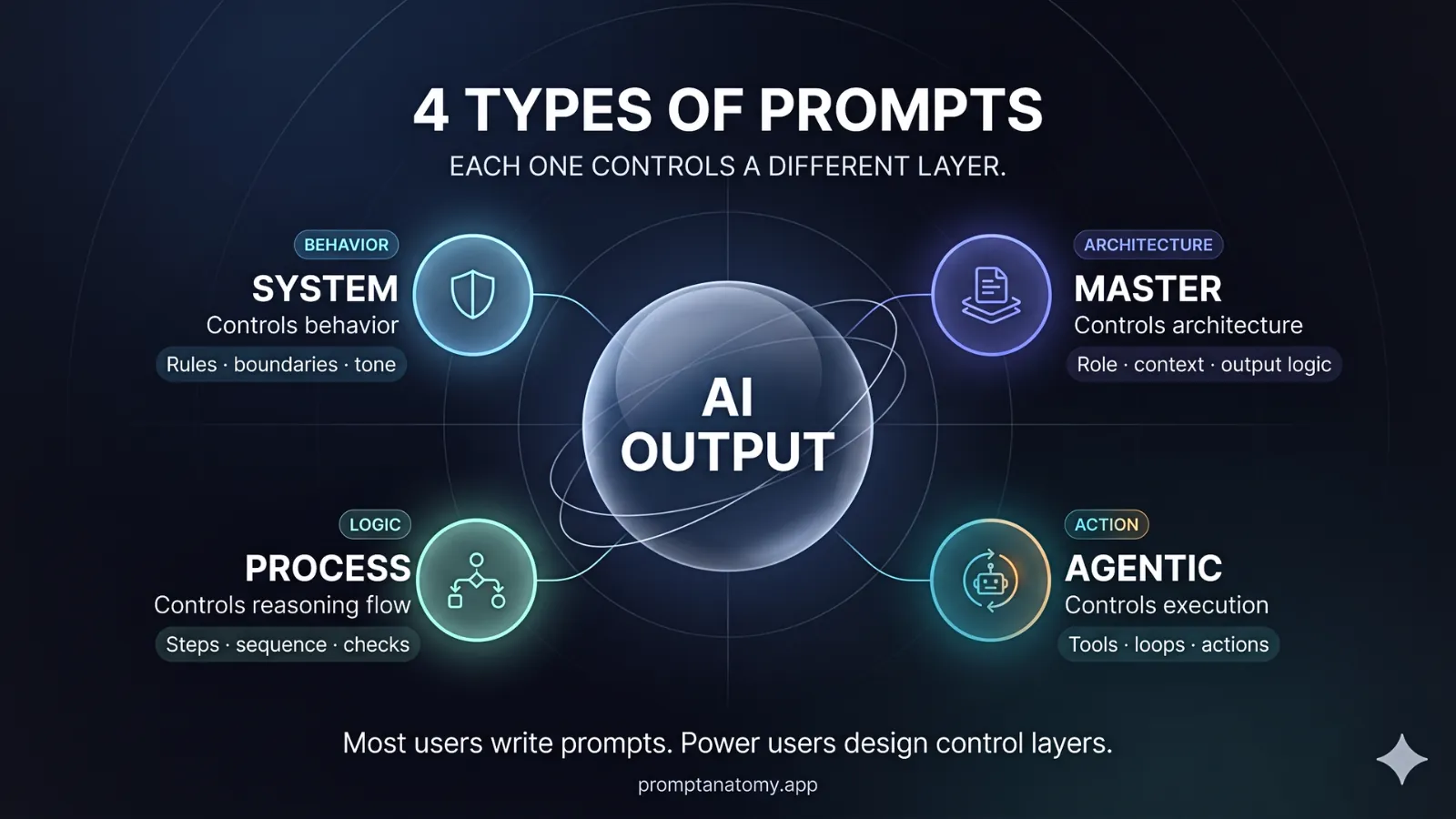
The hero orb labels System, Master, Process, Agentic—the Prompt Anatomy control stack (behavior, direction, steps, action). This article’s table uses System/policy, Task, Retrieval, Checker—roles for workflow steps and registry IDs. They align but are not identical: Master ≈ task framing plus constraints; Process ≈ step sequence; Agentic ≈ tool execution with gates; System/policy ≈ non-negotiable rules. Map both when you version prompts—do not merge them into one Slack doc.
Prompt types and roles
Splitting types makes ownership negotiable in governance forums: Legal can approve policy pack bumps without reviewing retrieval query syntax; IT can change connector scopes without rewriting task output JSON. The table is the vocabulary for those conversations—use IDs in registry rows, not informal nicknames in Slack.
| Type | Role | Example |
|---|---|---|
| System / policy | Non-negotiable rules | “Never quote pricing not in retrieved docs.” |
| Task | Goal and output contract for one run | “Produce JSON with fields A–D.” |
| Retrieval | Query formulation for search | “Find KB articles tagged refund.” |
| Checker | Validate draft against rules | “List unsupported claims.” |
| Transformation | Format or tone adjust | “Convert bullets to executive summary.” |
System / policy content should live in versioned packs referenced by hash—Legal approves bumps. Task prompts change when output contract changes—semver in registry. Retrieval prompts affect which evidence appears—test denial and happy paths. Checker prompts run on high-risk drafts before send—often better as rules plus small model pass. Transformation is optional polish—never the only compliance control.
How types combine in one run
A single customer-facing run still has an order of operations even if the UI shows one “Generate” button. Context architecture defines layer order: policy and task frames before operational retrieval fills the window, so the model does not optimize for fluency over compliance. Retrieval executes with scoped indexes per data boundaries; a failed denial path should log without generating a sendable draft.
Generation uses the task template; checker runs on draft output before the agent spends time editing prose that will be rejected. Human sends after override logged with reason code. Skipping type order—checker before retrieval, transformation before checker—creates pretty wrong answers faster.
Northline support-reply-v3 uses separate registry IDs: task-framing, retrieval-query, checker-claims—not one “support prompt” doc edited in Slack. Promotion of any ID requires eval cases tagged to that type so regressions do not hide inside a single mega-version number.
Practice: versioning and eval
Version each type separately in the registry—do not bump task version when only checker wording changes unless task output contract changed. Changelog entries should name which prompt_id moved and which eval_set_id was re-run; vague “prompt update” entries are audit dead ends.
Do not merge policy into task prompts ad hoc during incidents—emergency patches become permanent drift. Hotfix through versioned policy pack with Legal ack and eval re-run.
Run checker on every customer-facing draft in pilot—even when task prompt “looks fine.” Trap cases belong in evaluation hooks per type: retrieval must not return HR index; checker must flag uncited pricing.
When one type is enough
Early single-step pilots may use task + policy pack only when risk is low and humans read every output—internal summaries with no customer send, for example. Add retrieval and checker types when pass rate plateaus, overrides cluster on factual claims, or incidents show retrieval bleed. Signs you added types too late include Legal discovering phrasing that never came from approved packs and IT learning HR data appeared in a “support only” workflow.
Multi-agent handoff assigns types to specialist steps—each step one primary prompt role—so complexity grows with evidence, not with one message growing without bound.
Anti-patterns
Anti-patterns are common because mega-prompts feel faster in week one. They are expensive in week twelve when nobody can diff what changed before a customer incident.
- Policy paragraph appended by users in chat—bypasses Legal version control.
- Checker skipped for speed—fluent wrong answers reach customers.
- Retrieval embedded in task—cannot test search failures independently.
- Transformation before check—polish hides unsupported claims.
Match prompt type to workflow step—one mega-prompt rarely covers intake, generation, and verification with accountable change control. For named frameworks (RACE, TAG), see Prompt Frameworks for Business.